


How data is stored on optical discs, why a DVD holds seven times more than a CD, what the -R, -RW, and -RAM suffixes mean, and how long those discs actually survive.
CDs and DVDs are physically identical — 12 cm discs, 1.2 mm thick — yet a DVD holds roughly seven times more data. One thing accounts for it: the colour of the laser used to read them.
This article has been rewritten from its 2019 version. The old text covered the drives, which overlapped with types of optical drives . To stop the two competing with each other, this one now focuses on the discs — how data is stored on them and what separates each format.
How Data Is Stored on an Optical Disc
There is no magnetism and no electricity inside the disc. There is only a microscopically bumpy surface.
Data is recorded as a sequence of tiny depressions called pits, separated by flat areas called lands. This sequence runs along a single spiral track that winds from the centre outward — like a vinyl record, but in the opposite direction.
As the disc spins, a laser strikes its surface:
- Hitting a land — light reflects fully back to the sensor
- Hitting a pit — light scatters, and the reflection is much weaker
That difference in reflected intensity is what gets read as a sequence of bits. It really is that simple.
Why a DVD Holds More Than a CD
Because the laser reading it has a different wavelength.
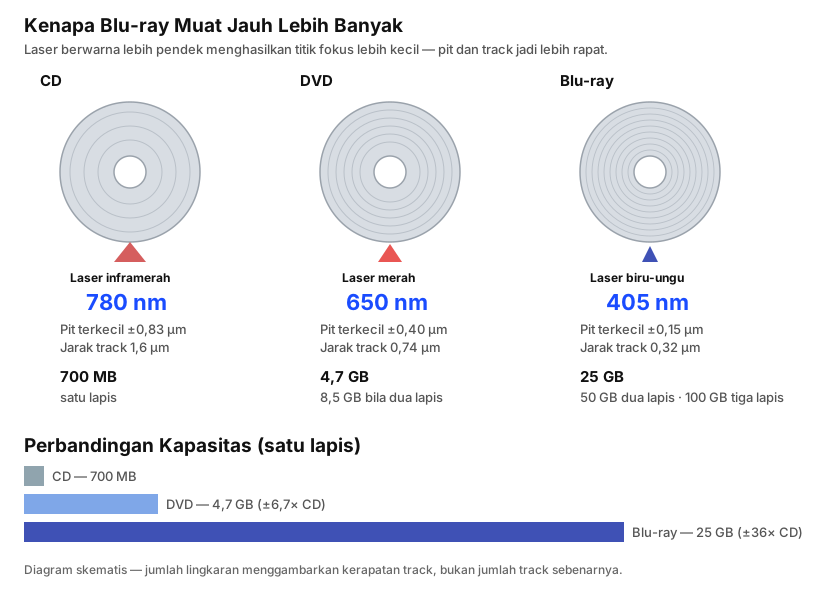
The shorter the wavelength, the smaller the spot a laser can focus to. A smaller spot means pits can be made smaller and the spiral track packed tighter — so more data fits into the same physical area.
| CD | DVD | Blu-ray | |
|---|---|---|---|
| Laser colour | Infrared | Red | Blue-violet |
| Wavelength | 780 nm | 650 nm | 405 nm |
| Smallest pit length | ±0.83 µm | ±0.40 µm | ±0.15 µm |
| Track spacing | 1.6 µm | 0.74 µm | 0.32 µm |
| Single-layer capacity | 700 MB | 4.7 GB | 25 GB |
| Dual-layer capacity | — | 8.5 GB | 50 GB |
The name “Blu-ray” comes directly from this — from the blue laser. The “e” in blue was deliberately dropped so the name could be registered as a trademark.
Disc Layer Structure
An optical disc is not a single solid slab but a stack of layers:
- Label on the very top surface
- Protective lacquer coating
- Reflective layer, usually aluminium — this is what makes a disc shine
- Data layer where the pits live
- Polycarbonate substrate 1.2 mm thick, the clear part the laser passes through
One detail surprises most people: on a CD, the data sits very close to the label side, not the clear side. Scratches on the clear side can often be corrected because the laser passes through 1.2 mm of material to reach the data. But a scratch on the label side can destroy the data layer outright.
DVDs have a different and safer structure in this respect — the data layer sits in the middle, sandwiched between two 0.6 mm polycarbonate halves.
What the Suffixes Mean: ROM, R, RW, and RAM
What confuses people is rarely the CD or DVD part — it is the letters after it.
| Suffix | Meaning | Writable? | Erasable? |
|---|---|---|---|
| ROM | Pressed with data at the factory | No | No |
| R | Write once (recordable) | Yes, once | No |
| RW | Rewritable | Yes | Yes, ~1,000 cycles |
| RAM | Randomly accessible like a hard drive | Yes | Yes, ~100,000 cycles |
The technical difference lies in the data layer:
- R discs use an organic dye that a laser burns permanently dark. Once darkened, it cannot be reversed.
- RW discs use a phase-change metal alloy that switches between crystalline and amorphous states. That change is reversible, which is what makes rewriting possible.
DVD-R vs DVD+R
Two competing standards developed by different consortia. In everyday use there is almost no difference — nearly every modern drive supports both.
The distinction only surfaces with older playback hardware, particularly home DVD players from the early 2000s, which sometimes recognise only one.
How Long Do Discs Last?
This is the question with the most disappointing answer.
| Type | Estimated Shelf Life |
|---|---|
| CD/DVD ROM (factory pressed) | 20–50 years |
| CD-R / DVD-R (burned yourself) | 5–15 years |
| CD-RW / DVD-RW | 5–10 years |
| M-DISC | Claimed centuries |
Discs you burn yourself last considerably less than factory-pressed ones. The organic dye is the reason — it fades gradually under heat, light, and humidity.
M-DISC is fundamentally different: data is genuinely etched into a rock-like inorganic layer rather than changing the colour of a dye. There is nothing to fade. The durability claim cannot be verified directly since the technology is not that old yet, but accelerated ageing tests support it.
Making Discs Last Longer
- Store them standing upright, not stacked flat
- Keep them away from direct sunlight and heat sources
- Store somewhere cool and dry — humidity accelerates degradation
- Handle by the edge and centre hole, never the data surface
- Clean from the centre straight outward, never in circles — circular scratches are far more damaging because they run along the data track
The Drives That Read Them
For reference, the two photos below from the original version of this article show the internal CD-ROM and DVD-ROM drives once fitted to nearly every computer.
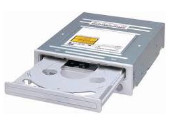
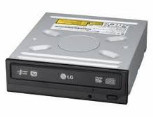
They look nearly identical from the outside — and they were. Only the laser inside differed. That is why people so often bought the wrong one, and why the label on the drive body was the only reliable way to be sure.
Full coverage of each drive type and its read-write capabilities is in types of optical drives .
Frequently Asked Questions
Are CDs and DVDs the same size? Yes, both are 12 cm discs 1.2 mm thick. The difference is entirely in data density, not physical dimensions.
How does a DVD film hold 8.5 GB? That is a dual-layer DVD. The laser can focus at two different depths within the same disc.
Can a DVD be played in a CD drive? No. A CD drive only has a 780 nm infrared laser, which cannot resolve the much smaller DVD pits.
Why won’t my burned disc play in a home DVD player? Most likely a format compatibility issue. Try DVD-R instead of DVD+R, and burn at a lower speed.
My disc is scratched — can it be saved? If the scratch is shallow and on the clear side, it often still reads thanks to error correction. Scratches on the label side are usually permanent.
Wrapping Up
Optical discs store data in a surprisingly simple way: microscopic depressions that reflect light differently. The entire capacity jump from CD to Blu-ray came from one change — using a shorter-wavelength laser so those depressions could be made smaller.
The most important thing to take from this article is not the capacity figures but the shelf life. Burned discs are not a permanent archive medium, and a great many family collections from the 2000s are now approaching their limit.
Want to know which drive handles which format? Read types of optical drives and what each one can do .