


Get to know the Repository Pattern in Golang
In the book Domain-Driven Design, Eric Evans explains that
This Repository Pattern is usually used as a bridge between the business logic of our application and all the SQL commands in the Database. So we will write all the SQL in the repository, while our business logic code only needs to use the repository that we have created.
So that you can better imagine it, here is the repository pattern diagram below.
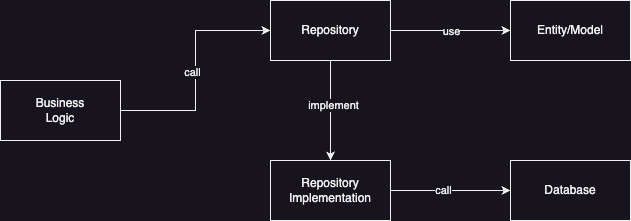
Entity or Model
In object-oriented programming, usually a table in the database will always be represented as an Entity or Model class, but Golang does not recognize Class, so we can represent the data in the form of Struct. This struct will make it easier for us to create program code. When we query the Repository, when we return an array, it is better to convert it first to an Entity struct or model so that we just use the object.
An example of the struct that we will use later in the implementation can be seen below.
1package model
2
3type Comment struct {
4    Id int32
5    Email string
6    Comment string
7}
Implementation of the Repository Pattern
Before we understand the entity or model, we will try to learn from the start how to implement it.
First we need to create a project folder learn-golang-repository-pattern and initialize the Golang project with the command below.
1go mod init github.com/santekno/learn-golang-repository-patternNext, we will create several folders as below.
1├── model
2│   ├── comment.go
3├── repository
4│   ├── new.go
5│   ├── comment.go
6├── database.go
7├── main.go
8└── go.mod
The contents of the comment.go file are the same entity or model for comments as above, namely.
1package model
2
3type Comment struct {
4    Id int32
5    Email string
6    Comment string
7}
Then, we create an init.go file in the repository folder to store the methods that we will call when we need a function in the database.
 1package repository
 2
 3import (
 4	"context"
 5	"database/sql"
 6
 7	model "github.com/santekno/golang-belajar-repository-pattern/model"
 8)
 9
10type CommentRepo struct {
11	DB *sql.DB
12}
13
14func NewCommentRepository(db *sql.DB) CommentRepository {
15	return &CommentRepo{
16		DB: db,
17	}
18}
19
20type CommentRepository interface {
21	Insert(ctx context.Context, comment model.Comment) (model.Comment, error)
22	FindById(ctx context.Context, id int32) (model.Comment, error)
23	FindAll(ctx context.Context) ([]model.Comment, error)
24}
In order to be able to implement the methods that have been defined in the interface above, we need to create a file, namely comment.go with contents as below.
 1package repository
 2
 3import (
 4	"context"
 5	"fmt"
 6
 7	model "github.com/santekno/golang-belajar-repository-pattern/model"
 8)
 9
10func (repo *CommentRepo) Insert(ctx context.Context, comment model.Comment) (model.Comment, error) {
11	result, err := repo.DB.ExecContext(ctx, "INSERT INTO comments(email,comment) VALUES(?,?)", comment.Email, comment.Email)
12	if err != nil {
13		return comment, err
14	}
15
16	insertId, err := result.LastInsertId()
17	if err != nil {
18		return comment, err
19	}
20
21	comment.Id = int32(insertId)
22	return comment, nil
23}
24
25func (repo *CommentRepo) FindById(ctx context.Context, id int32) (model.Comment, error) {
26	var comment model.Comment
27	query := "SELECT id, email, comment FROM comments WHERE id=? LIMIT 1"
28	rows, err := repo.DB.QueryContext(ctx, query, id)
29	if err != nil {
30		return comment, err
31	}
32	defer rows.Close()
33
34	for rows.Next() {
35		err := rows.Scan(&comment.Id, &comment.Email, &comment.Comment)
36		if err != nil {
37			return comment, err
38		}
39	}
40	return comment, nil
41}
42
43func (repo *CommentRepo) FindAll(ctx context.Context) ([]model.Comment, error) {
44	var comments []model.Comment
45	query := "SELECT id, email, comment FROM comments"
46	rows, err := repo.DB.QueryContext(ctx, query)
47	if err != nil {
48		return comments, err
49	}
50	defer rows.Close()
51
52	for rows.Next() {
53		var comment model.Comment
54		err := rows.Scan(&comment.Id, &comment.Email, &comment.Comment)
55		if err != nil {
56			fmt.Printf("error scan rows %v", err)
57			continue
58		}
59		comments = append(comments, comment)
60	}
61
62	return comments, nil
63}
Now that we have created all the repositories, it’s time to call the main program function so that we can run all the repositories. Before playing, we need to add a database connection first so we can connect to the database.
 1func GetConnection() *sql.DB {
 2	db, err := sql.Open("mysql", "root:belajargolang@tcp(localhost:3306)/belajar-golang")
 3	if err != nil {
 4		panic(err)
 5	}
 6
 7	db.SetMaxIdleConns(10)
 8	db.SetMaxOpenConns(100)
 9	db.SetConnMaxIdleTime(5 * time.Minute)
10	db.SetConnMaxLifetime(60 * time.Minute)
11	return db
12}
And below are the contents of the main() function which calls the repository that we have created.
 1func main() {
 2	ctx := context.Background()
 3	db := GetConnection()
 4	defer db.Close()
 5
 6	commentRepo := repository.NewCommentRepository(db)
 7
 8	// find all data comments
 9	comments, err := commentRepo.FindAll(ctx)
10	if err != nil {
11		panic(err)
12	}
13
14	for _, cm := range comments {
15		fmt.Printf("data %d: %v\n", cm.Id, cm)
16	}
17
18	// find all data by id
19	comment, err := commentRepo.FindById(ctx, 2)
20	if err != nil {
21		panic(err)
22	}
23	fmt.Printf("data : %v", comment)
24
25	// insert data
26	id, err := commentRepo.Insert(ctx, model.Comment{Email: "test@gmail.com", Comment: "komentar yuk"})
27	if err != nil {
28		panic(err)
29	}
30	fmt.Printf("lastId: %v", id)
31}
In the main() function we will call the function to connect to the database, then we initialize the comment repository and then we can use the repository to call source data from the database.
If we want to add a new method or new function which is related to retrieving data or saving data into the database. So, we simply add the Method to Interface and its implementation in the comment.go file. It’s easy, right? So our program code is encapsulated into an interface and will later be implemented into various methods that can be created.