


How to Implement Concurrency Pattern Fan In and Fan Out on Golang
Channels in Go
Creating concurrent programs in Go has a unique approach to handle and to implementation when we want share memory to communication. The approach is to share memory by communicating, instead of communicating by sharing memory which is not allowed in Go. This approach can be done by using channels that can be used by goroutines to communicate with each other.
To create a channel in Go, one can use the make() function.
Note that when creating a channel there are certain data types that need to be attached. This type can be any type supported by Golang. Attaching values to channels and retrieving values from channels can be done using this syntax.
There are several concurrency patterns that can be used to create concurrent programs in Go. The concurrency patterns that will be discussed in this blog are fan in, and fan out.
Fan In Implementation
*Fan In is a concurrency pattern that takes multiple inputs and uses them in a single channel. The Fan In Pattern works like a multiplexer. Here is a simple visualization of Fan In.
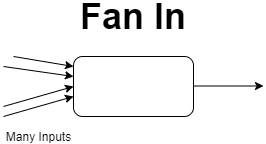
Here is a simple example using channel
 1package main
 2
 3import (
 4	"fmt"
 5	"math/rand"
 6	"time"
 7)
 8
 9func sleep() {
10	time.Sleep(time.Duration(rand.Intn(3000)) * time.Millisecond)
11}
12
13func producer(ch chan<- int, name string) {
14	for {
15		// sleep some random time
16		sleep()
17
18		// generate a random number
19		n := rand.Intn(100)
20
21		// send message
22		fmt.Printf("Channel %s -> %d\n", name, n)
23		ch <- n
24	}
25}
26
27func consumer(ch <-chan int) {
28	for n := range ch {
29		fmt.Printf("<- %d\n", n)
30	}
31}
32
33func fanIn(chA, chB <-chan int, chC chan<- int) {
34	var n int
35	for {
36		select {
37		case n = <-chA:
38			chC <- n
39		case n = <-chB:
40			chC <- n
41		}
42	}
43}
44
45func main() {
46	chA := make(chan int)
47	chB := make(chan int)
48	chC := make(chan int)
49
50	go producer(chA, "A")
51	go producer(chB, "B")
52	go consumer(chC)
53
54	fanIn(chA, chB, chC)
55}
program output:
 1Channel B -> 47
 2<- 47
 3Channel B -> 81
 4<- 81
 5Channel A -> 25
 6<- 25
 7Channel B -> 56
 8<- 56
 9Channel B -> 94
10<- 94
11Channel B -> 62
12<- 62
13Channel B -> 28
14<- 28
15Channel B -> 11
16<- 11
17Channel A -> 37
18<- 37
19Channel A -> 95
20<- 95
21Channel B -> 28
22<- 28
Based on the code displayed above, the data will be entered into 2 channels, namely channel A and channel B. Furthermore, it is printed with channel C where only channel C will print all input data from various channels.
Fan Out Implementation
Fan Out Pattern is a concurrency patter where many functions can read from the same channel until the channel is closed. Usually fan in and fan out patterns can be used simultaneously. Here is a simple visualization of Fan Out.
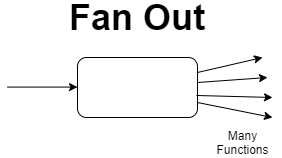
directly on the following sample example
 1package main
 2
 3import (
 4	"fmt"
 5	"math/rand"
 6	"time"
 7)
 8
 9func sleep() {
10	time.Sleep(time.Duration(rand.Intn(3000)) * time.Millisecond)
11}
12
13func producer(ch chan<- int) {
14	for {
15		// sleep some random time
16		sleep()
17
18		// generate a random number
19		n := rand.Intn(100)
20
21		// send message
22		fmt.Printf(" -> %d\n", n)
23		ch <- n
24	}
25}
26
27func consumer(ch <-chan int, name string) {
28	for n := range ch {
29		fmt.Printf("consumer %s <- %d\n", name, n)
30	}
31}
32
33func fanOut(chA <-chan int, chB, chC chan<- int) {
34	for n := range chA {
35		if n < 50 {
36			chB <- n
37		} else {
38			chC <- n
39		}
40	}
41}
42
43func main() {
44	chA := make(chan int)
45	chB := make(chan int)
46	chC := make(chan int)
47
48	go producer(chA)
49	go consumer(chB, "A")
50	go consumer(chC, "B")
51
52	fanOut(chA, chB, chC)
53}
Program output:
 1 -> 87
 2consumer B <- 87
 3 -> 59
 4consumer B <- 59
 5 -> 18
 6consumer A <- 18
 7 -> 40
 8consumer A <- 40
 9 -> 0
10consumer A <- 0
Based on the code created above, fan out is used for multiple outputs where if there is data entered in one channel, it will be processed by several channels that have been provided, in this code, the channels that process are channel A and channel B.