


Seven types of optical drive from CD-ROM to BD-RE, what each can read and write, why they disappeared from laptops, and when you genuinely still need one.
Optical drives are distinguished by what they can read and what they can write. The rule is simple: each generation adds to the previous one rather than replacing it. A Blu-ray drive still plays CDs from the 1990s.
This article has been updated from its 2019 version. The list of types still holds up as a reference, but the context has shifted entirely — optical drives have all but vanished from new laptops and desktops. The later sections explain why, and when you genuinely still need one.
Capability Matrix: All Types at a Glance
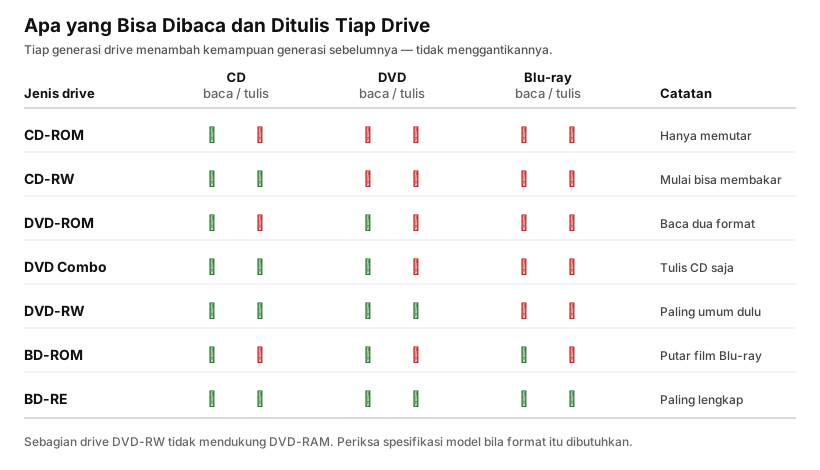
The pattern in that matrix: write capability always trails read capability by one step. A drive typically reads a newer format before it can write to it.
1. CD-ROM
The most basic drive. It can only read CDs — CD-ROM, audio CDs, VCDs, MP3 discs, and photo CDs. This applies to both standard 12 cm discs and 8 cm mini CDs.
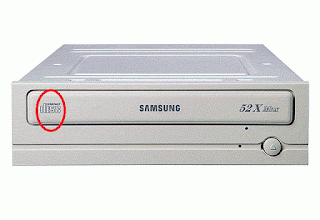
The number followed by an “X” in the specifications — 52X, for instance — indicates read speed relative to audio CD playback speed. One X is roughly 150 KB per second, so 52X means around 7.8 MB per second.
2. CD-RW
Reads CDs and writes to blank CDs. This is the drive that made the phrase “burning a CD” common.
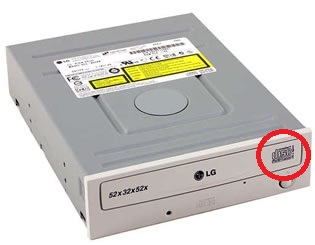
Two disc types are worth distinguishing:
- CD-R — write once. Data cannot be erased, only added while space remains.
- CD-RW — rewritable many times, typically up to around a thousand cycles.
3. DVD-ROM
Reads both CDs and DVDs, but writes nothing. It handles nearly every format — DVD-ROM, DVD movies, DVD audio — except DVD-RAM, which needs a dedicated drive.
4. DVD Combo
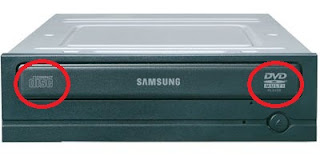
Combines DVD-ROM and CD-RW: it reads both CDs and DVDs, but only writes to CDs.
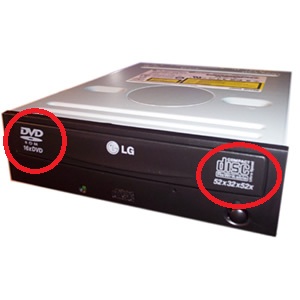
This type was briefly popular as a middle ground while DVD writers were still expensive. Once DVD-RW prices fell, DVD Combo disappeared from the market.
5. DVD-RW
Reads and writes every kind of CD and DVD. This was the standard fitting in computers for roughly a decade, and the one you will most often find in a second-hand machine.
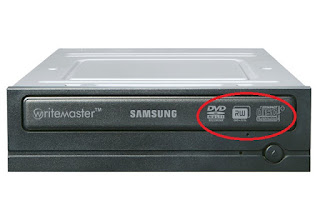
DVD-RAM support is not guaranteed. If you need that format, check the specifications of the specific model.
6. BD-ROM
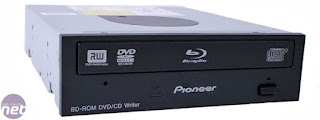
Reads CDs, DVDs, and Blu-ray, but cannot write Blu-ray. This is what you need to play Blu-ray films, including high-resolution releases.
7. BD-RE
The most complete: reads and writes all three formats. It is also the most expensive, and is almost always bought for one specific reason — archiving large volumes of data.
Why Did Optical Drives Disappear?
The 2019 version of this article still treated optical drives as standard equipment. That is no longer true, and four causes worked together.
Laptops got thinner. An optical drive needs roughly 12.7 mm of height — thicker than the entire body of many laptops today. That space is far more useful as battery.
Flash drives and memory cards got cheap. A 128 GB flash drive now holds the equivalent of dozens of DVDs, costs less, and can be rewritten indefinitely for practical purposes.
Distribution moved online. Software, games, and operating systems are all downloaded now. Windows installs from a flash drive, not a DVD.
Entertainment moved to streaming. This mattered most of all. The need to play films from a physical disc collapsed.
When Is an Optical Drive Genuinely Still Needed?
Several situations remain unresolved by anything else:
- Reading old archives. Photo, document, or music collections already committed to disc.
- Playing physical Blu-ray films. Picture and sound quality still exceed any streaming service, because the compression is far less aggressive.
- Very long-term archiving. M-DISC media is claimed to last centuries because data is etched into an inorganic layer rather than an organic dye.
- Systems that must stay off the network. Some industrial and government environments still use discs to move data into isolated systems.
- Older medical and laboratory equipment. Much of it can only export results to CD or DVD.
Choosing an Optical Drive Today
If you do need to buy one:
| Requirement | What to Get |
|---|---|
| Just reading old CDs and DVDs | External USB DVD drive, the cheapest option |
| Writing CDs and DVDs | External DVD-RW |
| Playing Blu-ray films | BD-ROM, confirm it supports your discs |
| Archiving large volumes | BD-RE, ideally with M-DISC support |
For external drives, watch the power requirement. Some Blu-ray drives draw more current than a single USB port supplies, so they ship with a split cable or a separate adapter.
Frequently Asked Questions
What is the difference between DVD-R and DVD+R? Two competing standards from different consortia. In practice there is almost no difference — nearly every modern drive supports both. It only matters with very old playback equipment.
Why can my drive read DVDs but not burn them? It is most likely a DVD-ROM or DVD Combo rather than a DVD-RW. Check the label on the drive body.
Can a Blu-ray drive play ordinary DVDs and CDs? Yes. Blu-ray drives carry lasers for all three formats.
Why do new laptops no longer have optical drives? The space went to battery and a thinner chassis, while the need it served was taken over by flash drives and the internet.
How long does a DVD last? Ordinary discs generally 5–15 years. M-DISC is claimed to last far longer because data is etched into an inorganic layer.
Wrapping Up
The optical drive is an interesting case of a technology not beaten by a direct successor, but made irrelevant by a change in how people obtain data. There is no “next generation optical drive” — the need it served simply moved elsewhere.
Even so, physical discs are not entirely dead. For long-term archiving and deliberately air-gapped systems, they still have a place.
Want to understand the discs themselves rather than the drives? Read CD vs DVD for a comparison of capacity, laser wavelength, and layer structure.