


We want to learn how to Kubernetes working in the development process. Kubernetes will gives some tags environments until we know the deployment what the labeling.
Kubernetes mechanisms work to ensure the required resources are present in the cluster and reach the desired state. This eliminates the need to manually update and deploy applications, which is time-consuming and can lead to human error.
On this occasion we are only trying to deploy single instance PODs from the application we have created. And we will also try to deploy using replication controllers or replica set.
If we look at Kubernetes Deployment below, it is at the top of the hierarchy where we can manage PODs and replica sets in one file..
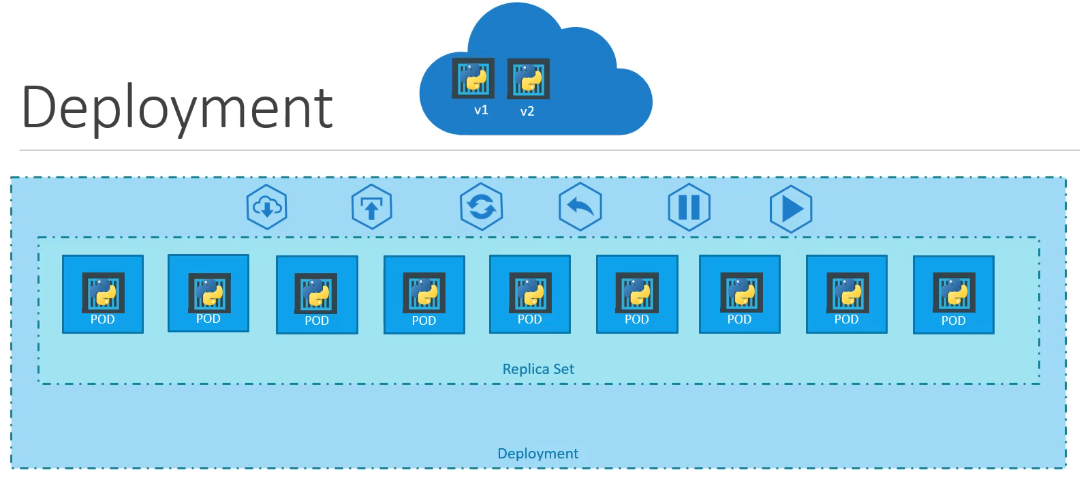
Create a Kubernetes Deployment
When we want to create a Kubernetes deployment file, the type we create must use
1kind: DeploymentReplicaSet but the only difference is the kind field.We try to create a YAML file with the name deployment-definition.yaml with contents like
 1apiVersion: apps/v1
 2kind: Deployment
 3metadata:
 4  name: myapp-deployment
 5  labels:
 6    app: myapp
 7    type: front-end
 8spec:
 9  template:
10    metadata:
11      name: myapp-pod
12      labels:
13        app: myapp
14        type: front-end
15    spec:
16      containers:
17        - name: nginx-container
18          image: nginx
19  replicas: 4
20  selector:
21    matchLabels:
22      type: front-end
When finished, try running the command below to create a Kubernetes deployment process.
1➜ kubectl create -f code/deployments/deployment-definition.yamlTo see whether the deployment process is running or not, we can see it with this command.
1➜ kubectl get deployments
2NAME               READY   UP-TO-DATE   AVAILABLE   AGE
3myapp-deployment   4/4     4            4           9s
It can be seen from the terminal that the deployment process is running well and 4 PODs are available.
then we look at the replicaset and its PODs with this command
1➜ kubectl get replicaset,pods
2NAME                               DESIRED   CURRENT   READY   AGE
3replicaset.apps/myapp-replicaset   4         4         4       4d20h
4
5NAME                         READY   STATUS    RESTARTS   AGE
6pod/myapp-replicaset-l568n   1/1     Running   0          4d20h
7pod/myapp-replicaset-ppr52   1/1     Running   0          4d20h
8pod/myapp-replicaset-rbhlp   1/1     Running   0          4d20h
9pod/myapp-replicaset-rrqc2   1/1     Running   0          4d20h
Everything is running well and the status is Running meaning there are no PODs that have errors or are not running well.
If we want more detail about the information we can deploy, we can use commands.
 1➜   kubectl describe deployment myapp-deployment
 2Name:                   myapp-deployment
 3Namespace:              default
 4CreationTimestamp:      Mon, 11 Mar 2024 14:15:46 +0700
 5Labels:                 app=myapp
 6                        type=front-end
 7Annotations:            deployment.kubernetes.io/revision: 1
 8Selector:               type=front-end
 9Replicas:               4 desired | 4 updated | 4 total | 4 available | 0 unavailable
10StrategyType:           RollingUpdate
11MinReadySeconds:        0
12RollingUpdateStrategy:  25% max unavailable, 25% max surge
13Pod Template:
14  Labels:  app=myapp
15           type=front-end
16  Containers:
17   nginx-container:
18    Image:        nginx
19    Port:         <none>
20    Host Port:    <none>
21    Environment:  <none>
22    Mounts:       <none>
23  Volumes:        <none>
24Conditions:
25  Type           Status  Reason
26  ----           ------  ------
27  Available      True    MinimumReplicasAvailable
28  Progressing    True    NewReplicaSetAvailable
29OldReplicaSets:  <none>
30NewReplicaSet:   myapp-replicaset (4/4 replicas created)
31Events:
32  Type    Reason             Age    From                   Message
33  ----    ------             ----   ----                   -------
34  Normal  ScalingReplicaSet  4m57s  deployment-controller  Scaled down replica set myapp-replicaset to 4 from 8
And we want to see the overall details of Clusters, PODs, Replicate and Deployment, we can type them with this command.
 1➜ kubectl get all
 2NAME                         READY   STATUS    RESTARTS   AGE
 3pod/myapp-replicaset-l568n   1/1     Running   0          4d20h
 4pod/myapp-replicaset-ppr52   1/1     Running   0          4d20h
 5pod/myapp-replicaset-rbhlp   1/1     Running   0          4d20h
 6pod/myapp-replicaset-rrqc2   1/1     Running   0          4d20h
 7
 8NAME                 TYPE        CLUSTER-IP   EXTERNAL-IP   PORT(S)   AGE
 9service/kubernetes   ClusterIP   10.96.0.1    <none>        443/TCP   11d
10
11NAME                               READY   UP-TO-DATE   AVAILABLE   AGE
12deployment.apps/myapp-deployment   4/4     4            4           5m59s
13
14NAME                               DESIRED   CURRENT   READY   AGE
15replicaset.apps/myapp-replicaset   4         4         4       4d20h
Update and Rollback Kubernetes Deployments
When we were deploying our service, one day something undesirable happened to the latest version or an error was found which resulted in our service not running properly.
So, we need a Rollout mechanism to return our service to a stable or previous version.
We can do this rollout method with a command
1➜ kubectl rollout status deployment/myapp-deployment
2deployment "myapp-deployment" successfully rolled out
We have tried rollout deployment, and we can see the commands we have carried out by looking at them
1➜ kubectl rollout history deployment/myapp-deployment
2deployment.apps/myapp-deployment
3REVISION  CHANGE-CAUSE
41         <none>
For example, we will simulate when something happens to our deployment that causes an error. Change the deployment YAML file that we created earlier
1replicas: 6So that we can see what the rollout status is, we will first try deleting the previous deployment with this command.
1➜ kubectl delete deployment myapp-deployment
2deployment.apps "myapp-deployment" deleted
and we try again to recreate it with the command
1➜ kubectl create -f code/deployments/deployment-definition.yaml
2deployment.apps/myapp-deployment created
If you have created it, immediately run the command below.
1➜ kubectl rollout status deployment/myapp-deployment
2Waiting for deployment "myapp-deployment" rollout to finish: 0 of 6 updated replicas are available...
3Waiting for deployment "myapp-deployment" rollout to finish: 1 of 6 updated replicas are available...
4Waiting for deployment "myapp-deployment" rollout to finish: 2 of 6 updated replicas are available...
5Waiting for deployment "myapp-deployment" rollout to finish: 3 of 6 updated replicas are available...
6Waiting for deployment "myapp-deployment" rollout to finish: 4 of 6 updated replicas are available...
7Waiting for deployment "myapp-deployment" rollout to finish: 5 of 6 updated replicas are available...
8deployment "myapp-deployment" successfully rolled out
We can see the status of each PODs running one by one for deployment. If we want to save the commands that we have used then we can do so when running the deployment, we add --record as below.
1➜ kubectl create -f code/deployments/deployment-definition.yaml --record
2Flag --record has been deprecated, --record will be removed in the future
3deployment.apps/myapp-deployment created
If we look at the --record flag, in the future it will be decreated by the Kubernetes team, but currently we can still use it.
Then we look at the command history that we have saved with the command below.
1➜ kubectl rollout history deployment/myapp-deployment
2deployment.apps/myapp-deployment
3REVISION  CHANGE-CAUSE
41         kubectl create --filename=code/deployments/deployment-definition.yaml --record=true
We try to change the YAML file that we have created by changing the image version of the container that is set, for example we are going to upgrade to version 1.18 then we change it with this command.
1➜ kubectl edit deployment myapp-deployment --record
2Flag --record has been deprecated, --record will be removed in the future
3deployment.apps/myapp-deployment edited
then look for containers image and add it to look like this
1- image: nginx:1.18And the results will be seen in the description as below.
 1➜  kubectl describe deployment myapp-deployment
 2Name:                   myapp-deployment
 3Namespace:              default
 4CreationTimestamp:      Mon, 11 Mar 2024 14:50:06 +0700
 5Labels:                 app=myapp
 6                        type=front-end
 7Annotations:            deployment.kubernetes.io/revision: 2
 8                        kubernetes.io/change-cause: kubectl edit deployment myapp-deployment --record=true
 9Selector:               type=front-end
10Replicas:               6 desired | 6 updated | 6 total | 6 available | 0 unavailable
11StrategyType:           RollingUpdate
12MinReadySeconds:        0
13RollingUpdateStrategy:  25% max unavailable, 25% max surge
14Pod Template:
15  Labels:  app=myapp
16           type=front-end
17  Containers:
18   nginx-container:
19    Image:        nginx:1.18
20    Port:         <none>
21    Host Port:    <none>
22    Environment:  <none>
23    Mounts:       <none>
24  Volumes:        <none>
25Conditions:
26  Type           Status  Reason
27  ----           ------  ------
28  Available      True    MinimumReplicasAvailable
29  Progressing    True    NewReplicaSetAvailable
30OldReplicaSets:  myapp-deployment-84ccc5558 (0/0 replicas created)
31NewReplicaSet:   myapp-deployment-7cd6f9c5d4 (6/6 replicas created)
32Events:
33  Type    Reason             Age                From                   Message
34  ----    ------             ----               ----                   -------
35  Normal  ScalingReplicaSet  7m58s              deployment-controller  Scaled up replica set myapp-deployment-84ccc5558 to 6
36  Normal  ScalingReplicaSet  70s                deployment-controller  Scaled up replica set myapp-deployment-7cd6f9c5d4 to 2
37  Normal  ScalingReplicaSet  70s                deployment-controller  Scaled down replica set myapp-deployment-84ccc5558 to 5 from 6
38  Normal  ScalingReplicaSet  70s                deployment-controller  Scaled up replica set myapp-deployment-7cd6f9c5d4 to 3 from 2
39  Normal  ScalingReplicaSet  45s                deployment-controller  Scaled down replica set myapp-deployment-84ccc5558 to 4 from 5
40  Normal  ScalingReplicaSet  45s                deployment-controller  Scaled up replica set myapp-deployment-7cd6f9c5d4 to 4 from 3
41  Normal  ScalingReplicaSet  43s                deployment-controller  Scaled down replica set myapp-deployment-84ccc5558 to 3 from 4
42  Normal  ScalingReplicaSet  43s                deployment-controller  Scaled up replica set myapp-deployment-7cd6f9c5d4 to 5 from 4
43  Normal  ScalingReplicaSet  40s                deployment-controller  Scaled down replica set myapp-deployment-84ccc5558 to 2 from 3
44 Normal ScalingReplicaSet 36s (x3 over 40s) deployment-controller (combined from similar events): Scaled down replica set myapp-deployment-84ccc5558 to 0 from 1Annotations field, it appears that we have received an updated revision with the name deployment.kubernetes.io/revision: 2 because we have updated the nginx version of the container image to 1.18.The information on containers has also changed to look like this
1Containers:
2   nginx-container:
3    Image:        nginx:1.18
For example, when we want to update the container image but it turns out that version is not available or if our service has an error, we will try to simulate it by first updating the image with the command below.
1➜ kubectl set image deployment myapp-deployment nginx-container=nginx:1.18-does-not-exist --record
2Flag --record has been deprecated, --record will be removed in the future
3deployment.apps/myapp-deployment image updated
Let’s look at history first
1➜ kubectl rollout history deployment/myapp-deployment
2deployment.apps/myapp-deployment
3REVISION  CHANGE-CAUSE
41         kubectl create --filename=code/deployments/deployment-definition.yaml --record=true
52         kubectl set image deployment myapp-deployment nginx=nginx:1.18-does-not-exist --record=true
63         kubectl set image deployment myapp-deployment nginx-container=nginx:1.18-does-not-exist --record=true
And let’s look at the details after we upgrade with a version image that doesn’t exist, it will look like this
 1➜ kubectl get deployment,pods,replicaset
 2NAME                               READY   UP-TO-DATE   AVAILABLE   AGE
 3deployment.apps/myapp-deployment   5/6     3            5           16m
 4
 5NAME                                    READY   STATUS             RESTARTS   AGE
 6pod/myapp-deployment-7cd6f9c5d4-bg67z   1/1     Running            0          9m15s
 7pod/myapp-deployment-7cd6f9c5d4-bt7qr   1/1     Running            0          9m15s
 8pod/myapp-deployment-7cd6f9c5d4-fvnrq   1/1     Running            0          8m45s
 9pod/myapp-deployment-7cd6f9c5d4-lqdwj   1/1     Running            0          9m15s
10pod/myapp-deployment-7cd6f9c5d4-rksfz   1/1     Running            0          8m50s
11pod/myapp-deployment-86c74f6c5d-fpv4n   0/1     ImagePullBackOff   0          2m1s
12pod/myapp-deployment-86c74f6c5d-pz6hk   0/1     ImagePullBackOff   0          2m1s
13pod/myapp-deployment-86c74f6c5d-sfbvb   0/1     ErrImagePull       0          2m1s
14
15NAME                                          DESIRED   CURRENT   READY   AGE
16replicaset.apps/myapp-deployment-7cd6f9c5d4   5         5         5       9m15s
17replicaset.apps/myapp-deployment-84ccc5558    0         0         0       16m
18replicaset.apps/myapp-deployment-86c74f6c5d   3         3         0       2m1s
We can see that in deployment there is a READY status 5/6 which means there is one POD that is in the process of upgrading its version but an error occurs and in UP-TO-DATE it appears that there are 3 new PODs that will run the latest version but an error occurs , then the AVAILABLE status has 5 PODs, which is still in the previous version.
If we look in more detail, we can see 3 PODs with the status ImagePullBackOff or ErrImagePull and 5 with the status Running.
When Kubernetes wants to update a deployment it will actually create a new ReplicaSet until everything is running and then the old ReplicaSet will be deleted. In a different case, when an error occurs it will look like this.
1NAME                                          DESIRED   CURRENT   READY   AGE
2replicaset.apps/myapp-deployment-7cd6f9c5d4   5         5         5       9m15s
3replicaset.apps/myapp-deployment-84ccc5558    0         0         0       16m
4replicaset.apps/myapp-deployment-86c74f6c5d   3         3         0       2m1s
So how can we return to the previous version? namely by rolling back with this command.
1➜   kubectl rollout undo deployment/myapp-deployment
2deployment.apps/myapp-deployment rolled back
Rollback was successfully and we well see back before to see that refer to this command.
 1➜ kubectl get deployment,pods,replicaset
 2NAME                               READY   UP-TO-DATE   AVAILABLE   AGE
 3deployment.apps/myapp-deployment   6/6     6            6           23m
 4
 5NAME                                    READY   STATUS    RESTARTS   AGE
 6pod/myapp-deployment-7cd6f9c5d4-bg67z   1/1     Running   0          17m
 7pod/myapp-deployment-7cd6f9c5d4-bt7qr   1/1     Running   0          17m
 8pod/myapp-deployment-7cd6f9c5d4-fvnrq   1/1     Running   0          16m
 9pod/myapp-deployment-7cd6f9c5d4-lqdwj   1/1     Running   0          17m
10pod/myapp-deployment-7cd6f9c5d4-rksfz   1/1     Running   0          16m
11pod/myapp-deployment-7cd6f9c5d4-rqcdv   1/1     Running   0          23s
12
13NAME                                          DESIRED   CURRENT   READY   AGE
14replicaset.apps/myapp-deployment-7cd6f9c5d4   6         6         6       17m
15replicaset.apps/myapp-deployment-84ccc5558    0         0         0       23m
16replicaset.apps/myapp-deployment-86c74f6c5d   0         0         0       9m57s
So, the deployment will be return to the original version nginx:1.18